

PaceFit Review: Can You Really Earn Money by Walking?
PaceFit is one of those apps that sits right at the intersection of fitness and rewards. The idea is simple on the surface: walk more, complete tasks, earn points, and eventually convert those points into real money or rewards.
I downloaded PaceFit myself and spent time going through the app step by step to understand how it actually works, how clear the earning system is, and whether it’s worth using if you’re completely new to fitness reward apps.
This review is based on real in-app usage, not just app store descriptions.
First Launch: The Spin Wheel and Instant Rewards
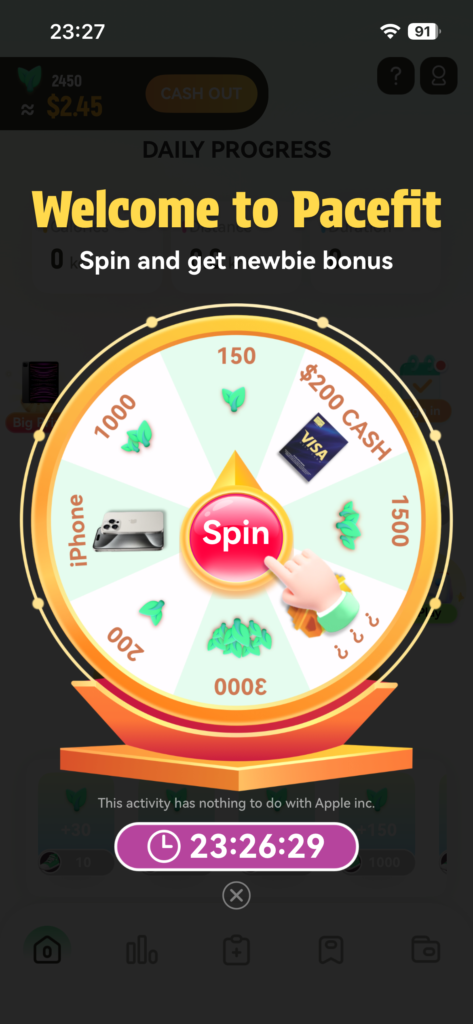
As soon as I opened PaceFit for the first time, the app immediately presented me with a spin wheel. This is clearly designed to hook new users right away.
By spinning the wheel, you can win:
- Points (which are the app’s main currency)
- And in some cases, even physical prizes, such as an iPhone 15
The wheel makes it feel like you’re already earning something before doing any walking at all, which is a nice onboarding touch compared to many similar apps that make you grind first.
Claiming Points (Ad Required, But Transparent)

When I landed on a points reward from the spin wheel, I was able to claim it immediately. The only requirement was watching a short advertisement.
Personally, I didn’t find this annoying — mainly because PaceFit clearly shows how much those points are worth in real money. That transparency matters a lot.
Many reward apps keep the value of points vague or hidden, which often leads to frustration later when users realize their points aren’t worth much. PaceFit does the opposite: you can clearly see how many points you have and what they translate to in cash value.
That clarity alone already puts PaceFit ahead of many competitors.
Fitness Data Dashboard (Why Everything Starts at Zero)
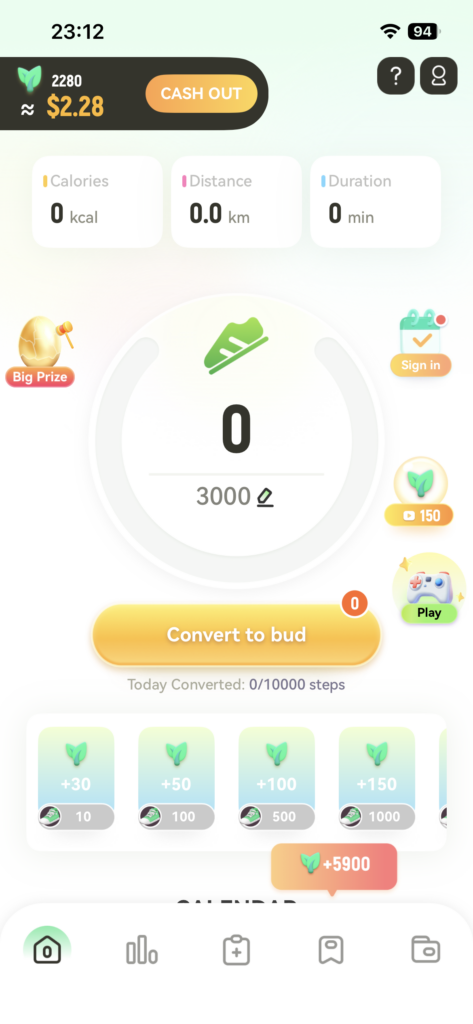
After the initial reward, I landed on the main dashboard. Here, PaceFit shows your fitness data such as steps and activity progress.
Since this was my first time opening the app, all of my stats were at zero. That’s not a bug — it simply means the app doesn’t yet have permission to access health or fitness data from my phone.
Without these permissions, PaceFit can’t track steps, and without steps, you won’t earn ongoing rewards.
Clear Instructions for Enabling Health Permissions
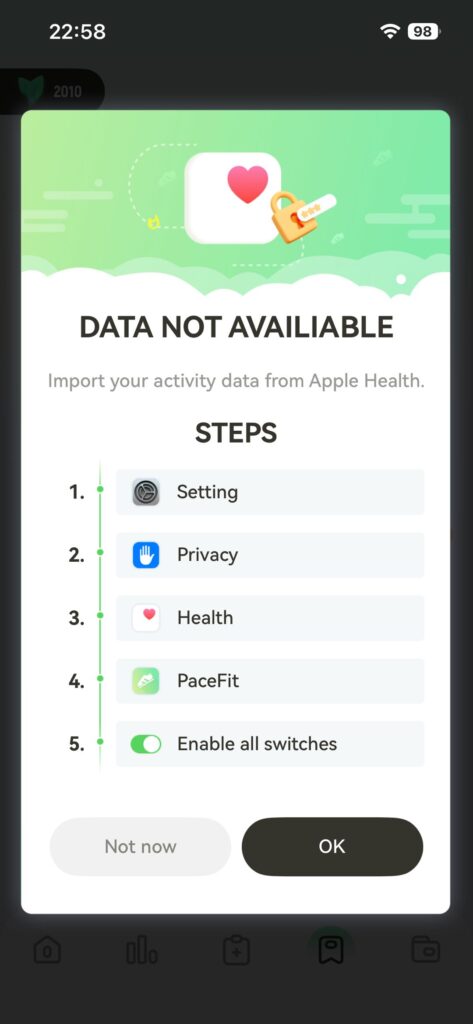
One thing I genuinely appreciated is how clearly PaceFit explains how to enable the required permissions.
Instead of forcing users to guess or dig through settings, the app provides step-by-step instructions that guide you directly to the correct place in your phone’s settings. Once permissions are enabled, PaceFit can start reading your movement data properly.
This makes the onboarding process much smoother, especially for users who aren’t very tech-savvy.
Task System: More Than Just Walking
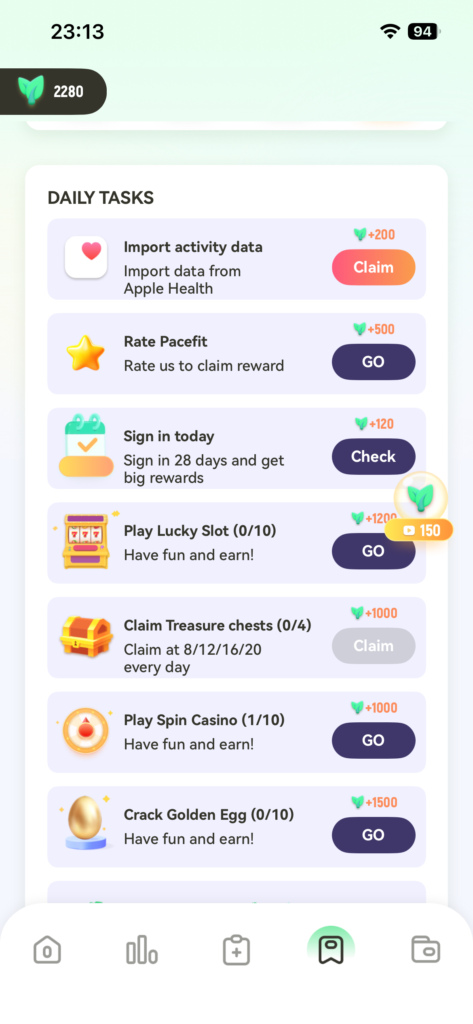
Inside the app, there’s a dedicated task section where you can see various missions you can complete to earn more points.
These tasks include:
- Walking-related goals
- App setup tasks (like enabling health permissions)
- Other simple actions designed to help you earn points consistently
Notably, one of the tasks directly relates to enabling health data access, which ties everything together logically. The task system gives users a sense of direction instead of leaving them wondering what to do next.
Withdrawal Rules: Clear Conversion Rate
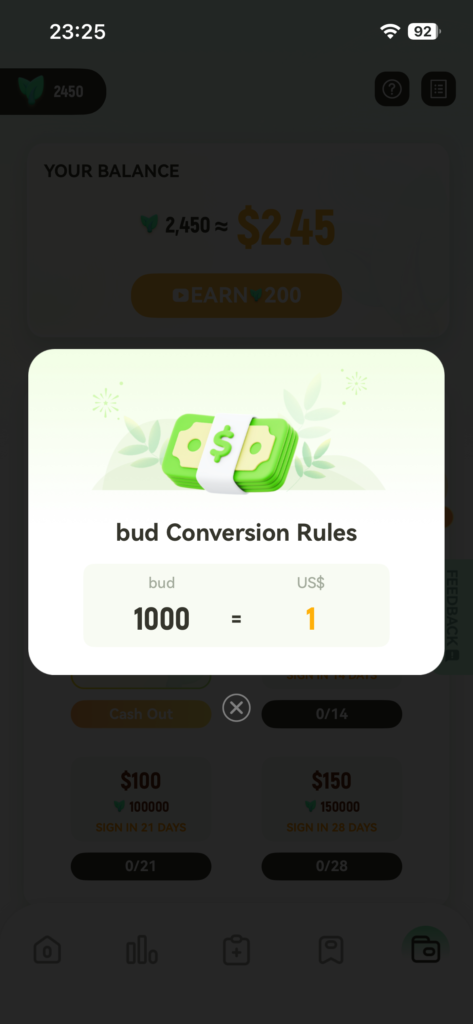
When I navigated to the withdrawal section, PaceFit again stood out for being very upfront.
By tapping on the withdrawal rules, I could clearly see that:
- 1,000 points = $1 USD
There’s no guessing here, no hidden formulas, and no vague “points may vary” language. You know exactly what you’re working toward.
Payout Options and Minimum Withdrawal Threshold
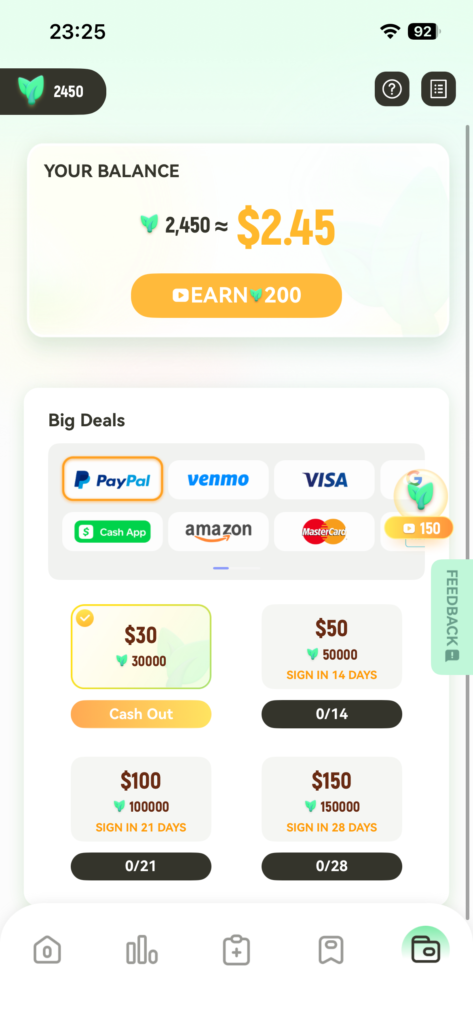
On the same screen, PaceFit lists a variety of withdrawal options. Users can choose from multiple payout methods rather than being locked into just one.
However, it’s important to note one key detail:
- The minimum withdrawal amount is $30
This means PaceFit is not designed for instant cash-outs. It’s more suited for users who are willing to use the app consistently over time and slowly build up their balance.
Final Thoughts: Who Is PaceFit Best For?
After using PaceFit hands-on, here’s my honest takeaway:
PaceFit is best suited for:
- Users who already walk or stay active daily
- People who value clear point-to-cash transparency
- Users comfortable earning slowly rather than instantly
It may not be ideal for:
- Anyone looking for fast payouts
- Users who dislike ads entirely
- People unwilling to wait until reaching a $30 minimum
That said, PaceFit does one thing very well: it clearly tells you what your effort is worth. In a space full of vague promises and unclear reward systems, that honesty makes a real difference.
If you’re already moving every day and don’t mind stacking points gradually, PaceFit can be a solid long-term companion rather than a quick-money app.